My First Programming Book Was For The Wrong Computer
I typed in every line of my first programming book and nothing worked. I hunted for typos for weeks. It took me until a few years ago, when I found a PDF of the book, to work out what had actually gone wrong.
My first programming book was Practical Things To Do With A Microcomputer, published by Usborne in 1983. I borrowed it from my school library, a good decade after that, by which point it was soft at the corners and had been stamped a lot of times.
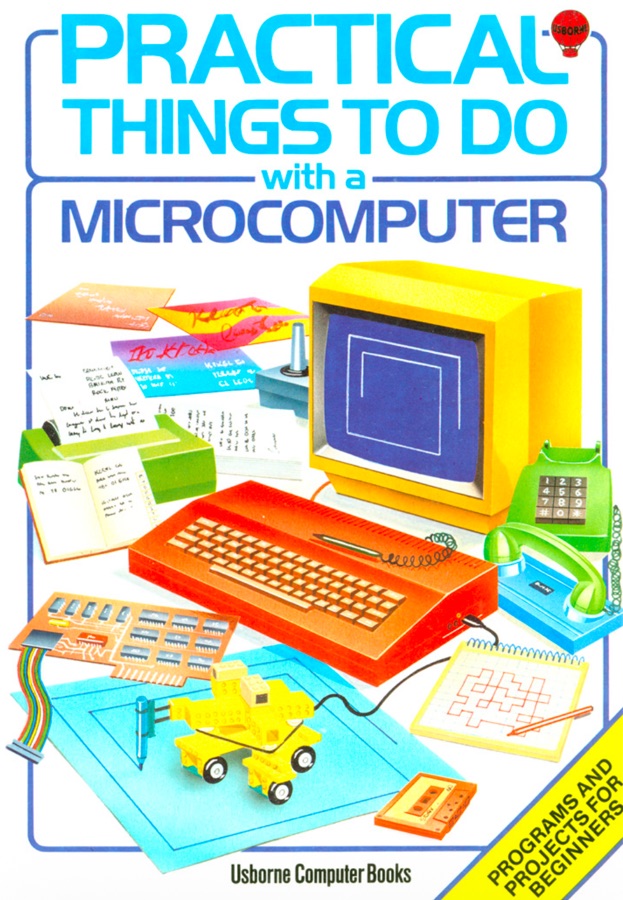
Look at that cover. A yellow monitor, an orange keyboard, a green telephone, a robot made of Lego. It promised that a computer was a thing you did things with rather than a thing you watched, which was exactly what I was after.
I should be honest about my expectations here. I fully believed that if I typed in the programs, things like that robot would appear. Not the physical Lego one, I understood I would have to build that. The pictures. The book is full of confident airbrushed illustrations of screens with things happening on them, and I assumed the programs inside produced something in that ballpark. Colour. Shapes. A robot.
Inside were programs. Actual programs, printed line by line, ready to be typed in. There was a downhill skiing game a few pages in and I decided that was the one.
Typing It In
The thing I was typing into was QBasic, which is worth a sentence of its own. Windows 95 did not install it. It sat on the Windows 95 CD, unpacked by nobody, in a folder called OLDMSDOS, which is Microsoft telling you exactly what they thought of it. Somebody had to go and fetch it off that disc and put it on the hard drive before I could type a single character.
So the tool was already filed under old, and the book was already thirteen years old, and neither of those facts meant anything to me at the time.
You have to understand what typing in a listing actually involved.
There was no copy and paste, because there was nothing to copy from. The program existed as ink on paper. The only route from the page into the machine went through my fingers, one character at a time, and I was not a fast typist.
I sat there with the book propped open and typed. Line ten. Line twenty. Every quote mark, every semicolon, every dollar sign. You lose your place constantly, because your eyes have to jump from the screen back to the page and find the exact character you stopped at, so you end up saying each line out loud as you go.
It took the whole afternoon, and I was genuinely proud of it in the way you are proud of a job done carefully.
Then I opened the Run menu and chose Start.
Nothing
It did not work.
Not “it ran but the skier was in the wrong place”. Not “it fell over after a minute”. It stopped immediately, on an error, and gave me a line number.
And obviously I assumed it was me. The book was printed. It had been through an editor and a publisher and a print run. I was a kid who had just spent four hours typing with two fingers. Between those two things, the fault was clearly mine.
Looking For A Typo That Wasn’t There
So I went hunting.
I checked the line it complained about, character by character, against the page. It matched. I checked it again. It still matched. I decided I must be reading it wrong, deleted the line and retyped it. Same error.
Then I went through the whole listing. Then I gave up and typed the entire thing in again from scratch, on the theory that somewhere in there was a mistake I had gone blind to.
Same error, same line.
There was nowhere to go with this. No search box, no forum, nobody in the house who knew what a syntax error was. The book was the only authority available and the book was telling me to type something that did not work.
I Knew Something Was Off
Here is the part I did get right, sort of.
The line numbers bothered me. Ten, twenty, thirty, forty, marching down the left of every line like a filing system. I had nothing to compare them against. This was the first program I had ever tried to put into a computer, so I had no idea what a normal one was supposed to look like. But I got the idea from somewhere that QBasic did not need them.
I genuinely cannot tell you where that came from. I have no memory of working it out or being told. It just arrived, the way things did.
So I typed the whole thing in again, without them.
That was as far as I could take it. I had noticed that the listing and my machine did not agree about something, and I was right, and it did me no good whatsoever. Why it mattered, what it meant about where the program had come from, and what you were supposed to do about it were all well outside anything I had access to. I filed it under “computers are strange” and moved on, which at that age is a perfectly rational thing to do.
The Book That Worked
At some point my parents worked out I was stuck, and a different book turned up. The Complete Idiot’s Guide to QBasic by Greg Perry, 1994.
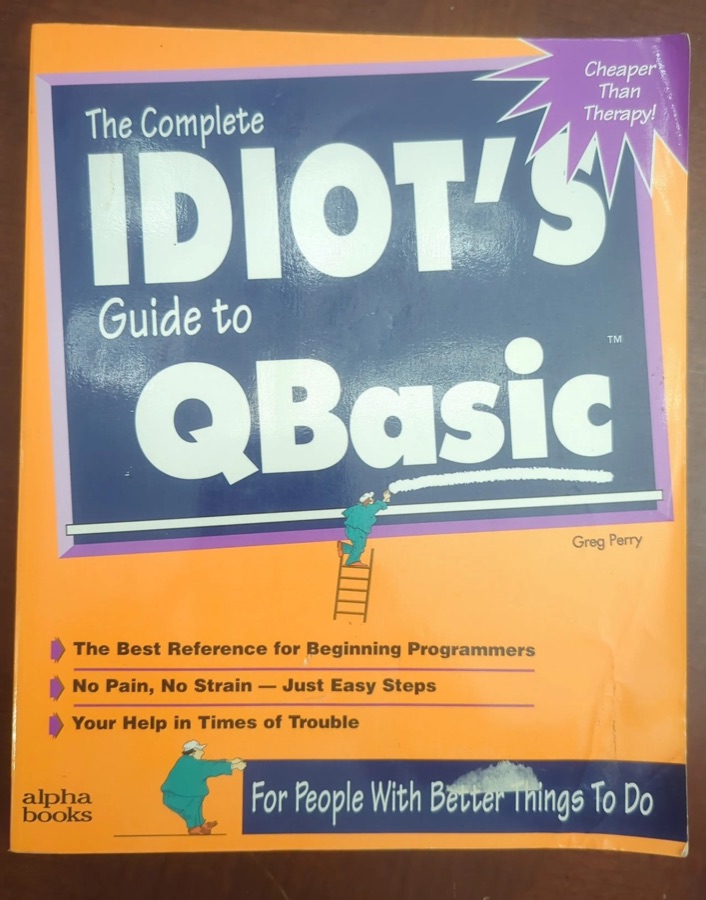
Cheaper Than Therapy, it says on the front. For People With Better Things To Do. It is not a beautiful object the way the Usborne one is. There is no robot made of Lego anywhere on it.
But every single thing in it was for the software that was actually on my screen.
I typed in the first program and it ran. I changed a number and the thing on screen changed with it. I typed in the next one and that ran too. Nothing fought me. That is where I actually started, and the skiing game went in a drawer along with the rest of it.
Then, About Twenty-Five Years Later
A few years ago I stumbled across a PDF of the Usborne book online.
I was flicking through it for the nostalgia, the airbrushed illustrations and the confident 1983 predictions, and then I hit page 21 and there was the downhill racer. The exact listing. The one that had beaten me.
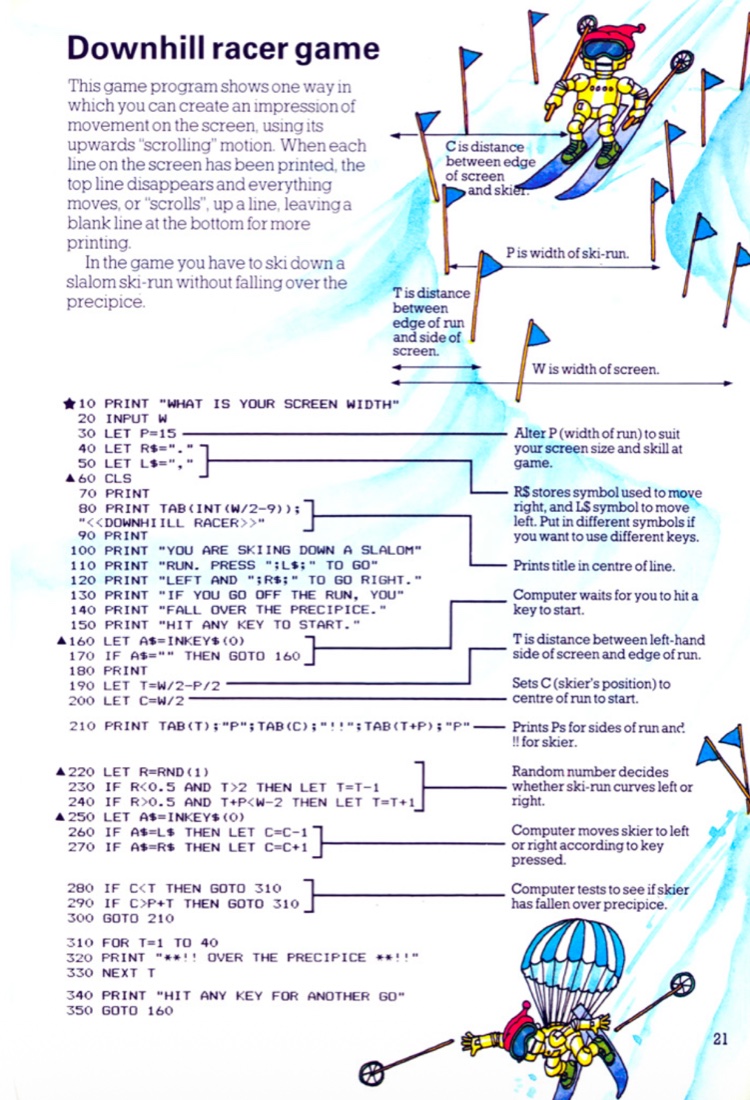
It landed in about a second. That is BBC BASIC. It was never going to run in QBasic.
Twenty-five years of professional programming, and it turned out the answer was one line of context that nobody in my orbit in 1996 happened to have. The book was written for a BBC Micro. I had never seen a BBC Micro. I had never heard of Acorn. I had no reason at all to suspect that the word BASIC on the cover of a book and the word BASIC on my screen might be two different languages.
And look at the margin. There is a star next to line 10 and triangles next to 60, 160, 220 and 250. Those symbols point at a conversion chart telling you which lines to change for your particular machine. The book warned me. I was twelve and I wanted the skiing game, not the appendix.
What Was Actually Wrong
Paste the listing into a QBasic emulator today and it will not even read the thing.
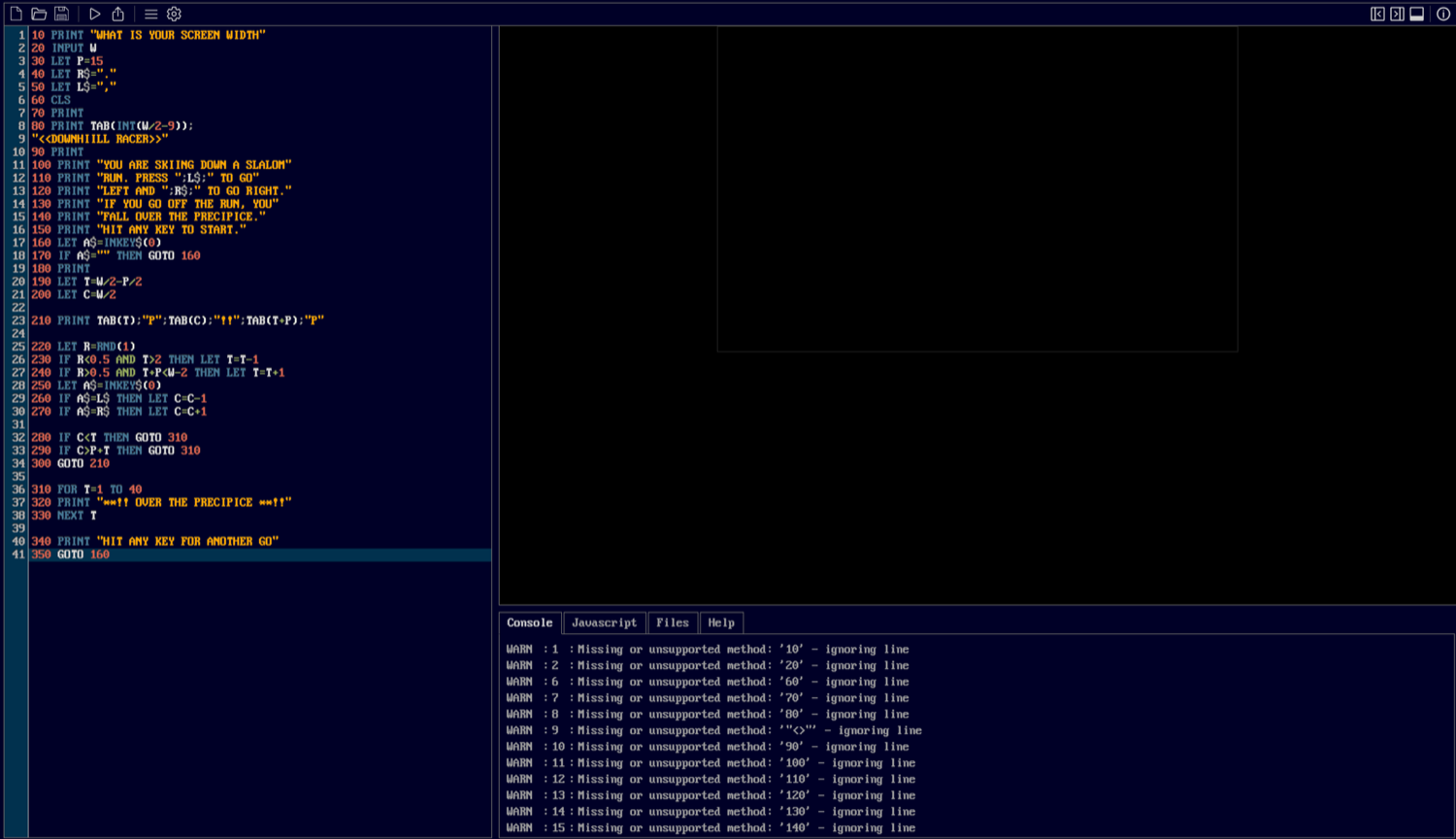
It is not one error. It is the same error, over and over, all the way down:
WARN : 1 : Missing or unsupported method: '10' - ignoring line
WARN : 2 : Missing or unsupported method: '20' - ignoring line
WARN : 6 : Missing or unsupported method: '60' - ignoring line
WARN : 7 : Missing or unsupported method: '70' - ignoring line
WARN : 8 : Missing or unsupported method: '80' - ignoring line
Ten. Twenty. Sixty. Seventy. Eighty. It reads the line number, decides 10 must be the name of something it is supposed to call, cannot find it, and throws the whole line away. Every PRINT, every INPUT, every CLS, gone. Not misunderstood, discarded.
And that is where my memory and the facts part company, because that is a browser emulator, not QBasic.
Microsoft’s QBasic accepts line numbers. It does not need them and would rather you used labels, but put a number in front of every line and it will run the program quite happily. Which means the wall I hit in 1996 was not the wall in that screenshot, and the thing I fixated on for weeks was the one part of that listing QBasic had no problem with at all.
The actual fault was two lines, 160 and 250, and it is the same fault twice:
160 LET A$=INKEY$(0)In BBC BASIC, INKEY$ takes an argument: the number of centiseconds to wait for a keypress, so INKEY$(0) means look right now and do not hang about. In QBasic, INKEY$ takes no argument at all. It is just INKEY$. Put brackets after it and the interpreter stops, because you have handed it something it cannot parse. That line is the engine of the whole game, the bit that notices you pressing a key without stopping to wait for you, and it appears twice.
There is one other thing worth pointing out, and this one is the book’s own doing. In the printed listing, line 80 is too long for the column, so "<<DOWNHIILL RACER>>" sits underneath it on its own line as a continuation. Type it exactly as it appears on the page, which is precisely what a careful twelve year old does, and you have made a line consisting of nothing but a string in quotes. The book’s layout generated a bug.
The One Thing I Changed Was The Only Thing That Was Fine
Here is the part that still makes me wince.
On a BBC Micro those numbers are load bearing. They are the structure of the program, they are how you insert a line between two others, and they are how the program refers to itself. Lines 170, 280, 290, 300 and 350 all say GOTO followed by a number.
Take the numbers out, which is exactly what I did, and every one of those jumps is pointing at nothing. GOTO 160. There is no 160. There is no anything.
So I had one idea. The idea was correct, QBasic really does not need line numbers. Acting on it turned a program with one error I could never have found into a program with six, and sent me back through the whole thing looking for typos that were never there.
The whole thing came down to four characters. The (0) on line 160 and the (0) on line 250. Delete those two and leave everything else exactly as printed, line numbers and all, and it runs. LET works. CLS works. TAB inside a PRINT works. RND(1) returns a number between 0 and 1 in both dialects. Even the scrolling trick the entire game is built on, printing past the bottom of the screen so everything shifts up a line, behaves the same way.
Thirty-five lines, one incompatible function, used twice, and no chance on earth of me finding it.
BASIC was never one language. It was a family of languages that shared a name, and nothing on the cover said which one was inside.
That was completely normal in 1983. Every manufacturer shipped its own BASIC in ROM, so a book either picked one machine or, like this one, printed a single listing and a conversion chart in the back. By the time it got to my school library the machines it was written for had been dead for a decade, and the chart may as well have been in Latin.
What It Should Have Looked Like
Here is the listing on the left, exactly as it is printed, and on the right the same program running the way it was supposed to.
Steer with the comma and the full stop, because that is what lines 40 and 50 say to use. Go outside the run and you fall over the precipice, which the program will announce forty times in a row before offering you another go.
Four hours of typing. That is what it was for.
And This Is The Version That Works
That first one is dressed as a BBC Micro, the machine the listing was written for. It is not the machine I had. What I had was QBasic, and getting the program running in QBasic is the thing I never managed.
So here it is, running in QBasic, thirty years late.
Click into the screen, give it a width when it asks, then hit any key. It is the same thirty-five lines, doing what the book said they would do.
Here is what I had to change to get there:
' DOWNHILL RACER
' From "Practical Things To Do With A Microcomputer" (Usborne, 1983),
' where it is printed in BBC BASIC.
'
' What QBasic itself needed:
'   INKEY$(0) becomes INKEY$, because QBasic's INKEY$ takes no argument
'   RANDOMIZE TIMER, or every run down the hill is the same run
'
' What this browser emulator needed on top of that:
'   no line numbers and no GOTO, so the jumps became DO...LOOP blocks
'   no TAB() in PRINT, so each row is built with SPACE$ and MID$
'   R renamed to RN, because it does not keep R and R$ apart the way
'     QBasic does, so LET R=RND(1) was quietly eating the "go right" key
'   _LIMIT, or it plays itself at about 10,000 lines a second
'
' The misspelt title is the book's. It stays.

RANDOMIZE TIMER

PRINT "WHAT IS YOUR SCREEN WIDTH"
INPUT W
IF W < 24 OR W > 78 THEN W = 40
P = 15
R$ = "."
L$ = ","
CLS
PRINT
PRINT SPACE$(INT(W / 2 - 9)); "<<DOWNHIILL RACER>>"
PRINT
PRINT "YOU ARE SKIING DOWN A SLALOM"
PRINT "RUN. PRESS "; L$; " TO GO"
PRINT "LEFT AND "; R$; " TO GO RIGHT."
PRINT "IF YOU GO OFF THE RUN, YOU"
PRINT "FALL OVER THE PRECIPICE."
PRINT "HIT ANY KEY TO START."

DO
    DO
        A$ = INKEY$
        _LIMIT 60
    LOOP WHILE A$ = ""

    PRINT
    T = W / 2 - P / 2
    C = W / 2

    DO
        Row$ = SPACE$(W + 2)
        MID$(Row$, INT(T) + 1, 1) = "P"
        MID$(Row$, INT(C) + 1, 2) = "!!"
        MID$(Row$, INT(T + P) + 1, 1) = "P"
        PRINT RTRIM$(Row$)
        _LIMIT 8
        RN = RND(1)
        IF RN < .5 AND T > 2 THEN T = T - 1
        IF RN > .5 AND T + P < W - 2 THEN T = T + 1
        A$ = INKEY$
        IF A$ = L$ THEN C = C - 1
        IF A$ = R$ THEN C = C + 1
    LOOP WHILE C >= T AND C <= P + T

    FOR I = 1 TO 40
        PRINT "**!! OVER THE PRECIPICE **!!"
    NEXT I
    PRINT "HIT ANY KEY FOR ANOTHER GO"
LOOP
The first two changes are the QBasic ones, and they are the ones a twelve year old would have needed in 1996.
The rest are not QBasic’s fault. Real QBasic has GOTO, and takes a label as happily as a line number. Real QBasic has TAB() inside a PRINT. Both are ordinary, documented QBasic, and both would have worked fine on that beige box. QBJS simply does not implement them, so on this page they had to go.
The variable rename is the one I like best. In QBasic, R and R$ are two separate variables that happen to share a letter. In QBJS they are the same variable, so line 220’s LET R=RND(1) quietly overwrites whatever is sitting in R$, which in this program is the key you press to go right. Left works, right does nothing, and nothing on screen tells you why.
Which is to say I sat down to port a program from one dialect of BASIC to another, and got caught out by a third dialect on the way.
It is, and I say this with real affection, not a great game. The skier is two exclamation marks. The slalom run is a column of letter P. The precipice is the absence of a letter P. The entire graphics engine is the fact that text scrolls upwards when you print past the bottom of the screen, which the book explains on the same page as if it were a trade secret, and in 1983 it more or less was.
There is no robot.
I would have absolutely loved it anyway.
John Croucher builds practical software and AI systems for Australian businesses, focused on solving real problems with measurable outcomes.